Skip to content
Beta Vibe Sentinel is in beta. Features may be added, changed, or removed without notice.
100% local · zero bytes leave your Mac

Security companion for AI-assisted development

Your clipboard, redacted before it leaves your Mac.

Vibe Sentinel guards three layers: clipboard, repos, and packages, so credentials never reach an LLM, malicious code never runs on `code .`, and compromised dependencies never reach `npm install`.

See what we detect

macOS only 14.0+ · Universal, Apple Silicon + Intel

100+
Credential patterns detected
1.5M+
Compromised passwords verified offline
25+
Repo malware heuristics
<3MB
Memory footprint for full detection
~10ns
Avg lookup time per query

Three layers, one app.

Clipboard, repos, packages.

Every direction your code moves is covered — text leaving you, repositories arriving at you, and dependencies in between.

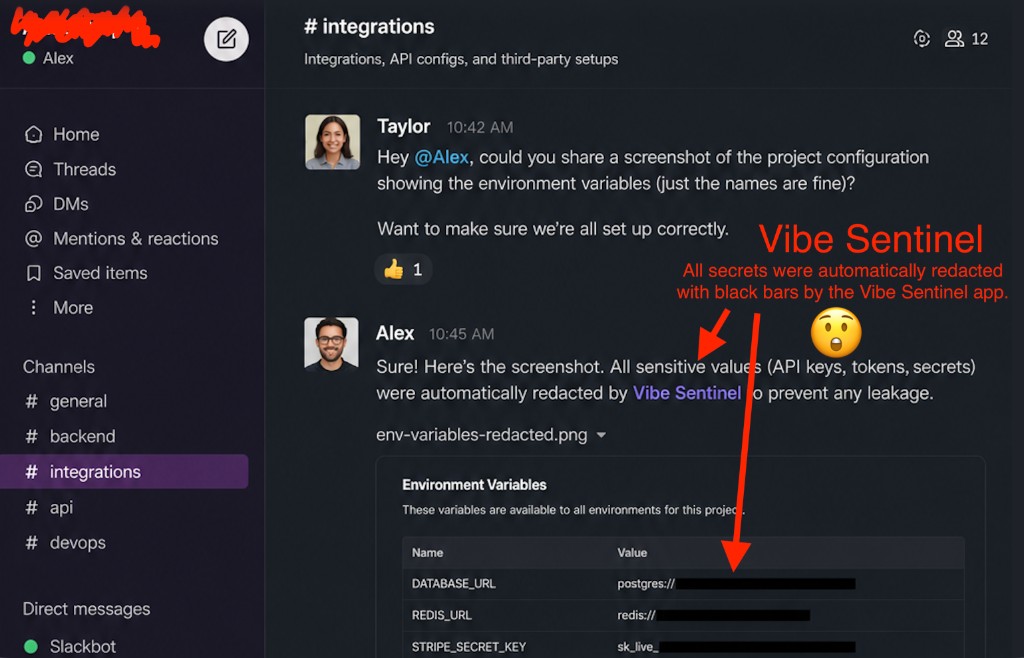
Slack conversation showing environment variables with sensitive values automatically redacted by Vibe Sentinel

Outbound · Vision

Screenshots redacted before they leave your mac

Share env-var screenshots or terminal captures in Slack without thinking twice. Vibe Sentinel scans every image on paste and draws opaque black bars only over secrets — API keys, tokens, connection strings.

  • 30+ languages, auto-detected
  • Opaque rectangles, not blur (blur can be reversed by AI)
  • QR codes and barcodes scanned — embedded credentials caught too
  • EXIF / GPS stripped automatically from photos
  • ~300ms on a 1080p screenshot — imperceptible in the paste flow

30+ languages. Zero cloud calls.
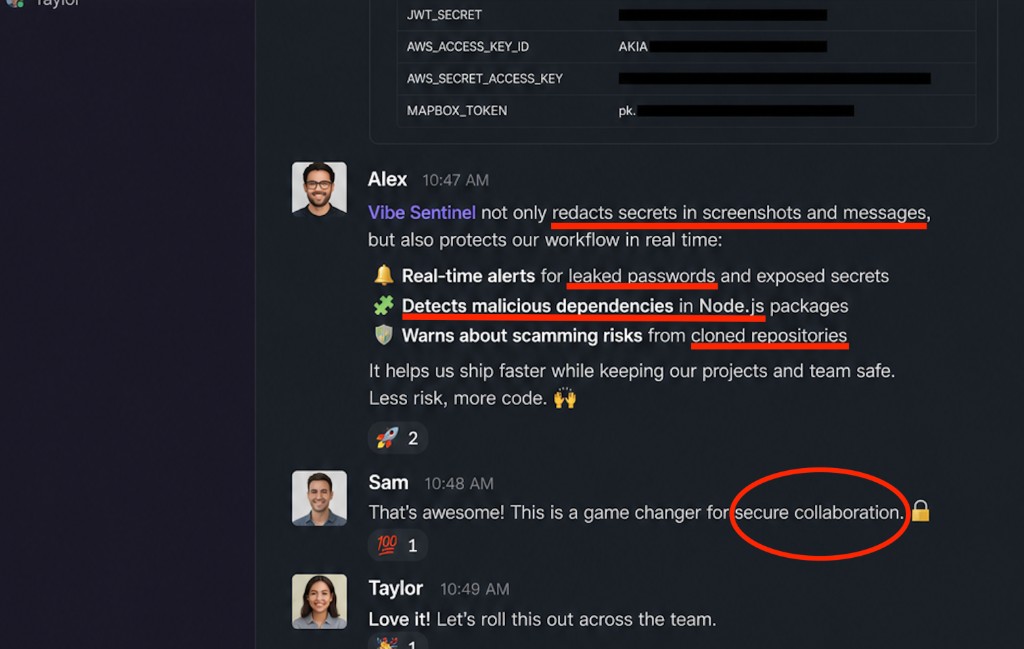
Slack thread describing Vibe Sentinel real-time alerts, dependency checks, and repository protection

Clipboard · Supply chain · Repos

Real-time alerts across your whole workflow

Redaction is just the start. Vibe Sentinel watches passwords, packages, and local repositories in parallel — so leaks, typosquats, and scam repos get caught before damage spreads.

  • Leaked-password alerts from 1.5M breach entries — checked on-device, zero network
  • Malicious dependency detection for npm, PyPI, and pub before install runs, just when you copy the command.
  • 25+ rules catch scam repos — `.vscode/tasks.json` auto-run, `postinstall` curl|sh, credential exfil
  • Watched folders scan new clones and zips before you open them

Less risk, more code.

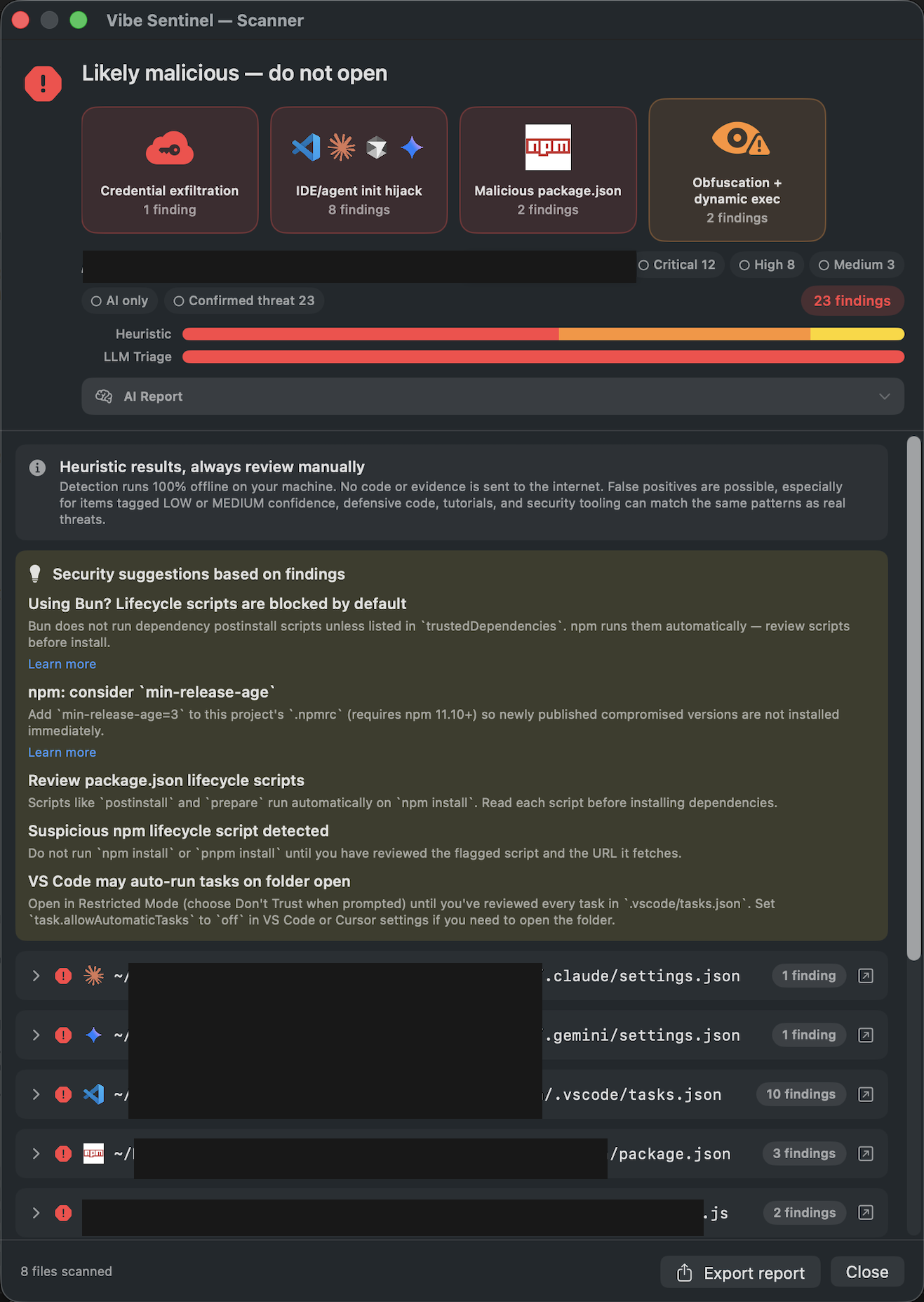
Vibe Sentinel scanner window showing a "Likely malicious" verdict with grouped findings, severity badges, and a list of suspicious files

Repo scan · Watched folders

See exactly what is malicious before you open it

When a watched folder catches a new clone or zip, the scanner opens with everything you need to decide: findings grouped by category, severity badges, and the exact files that triggered each rule. You stay in control. Nothing runs, nothing leaves your Mac.

  • Detection runs 100% on your machine, zero network calls
  • Findings grouped by intent: credential exfiltration, IDE/agent init hijack, malicious package.json, obfuscation
  • Severity scoring (Critical / High / Medium) so you can triage at a glance
  • Actionable suggestions next to each finding, with links to learn more
  • Export the report or close. No automatic action without your call
  • Local Artificial Intelligence to help reduce false positives

100% offline. You decide what runs.

The shortcut you already know

Cmd+V, but safe by default.

Toggle Vibe Mode once — your muscle-memory shortcut becomes protected paste. Copy-time alerts and watched-folder scans run alongside, no extra shortcuts to memorize.

Vibe Mode ON

  • ⌘ V → Protected paste
  • ⌘ ⌥ V → Raw paste (escape hatch)

Forgetting to protect stops being possible.

Vibe Mode OFF (default)

  • ⌘ V → System paste
  • ⌘ ⌥ V → Protected paste

Three moments. Three protections.

⌘ V Vibe Mode on

Redacts text and screenshots before paste

  • Passwords
  • API Keys
  • JWT
  • Bearer Tokens
  • AWS Keys
  • DB URLs
  • Private Keys
  • +100 patterns
⌘ C Clipboard watch

Alerts you before damage spreads

  • Compromised npm install
  • Suspicious pip install
  • Known leaked password
  • Passwords in HTTP headers
Watched folders Before you open

Scans new clones and downloads

  • Malicious repo clone
  • Compromised project ZIP

Stop leaking. Start coding safely.

macOS 14+. Universal binary.

Fits where work already happens

Built for every team that copies secrets all day.

For devs using AI tools

Cursor, Claude Code, Windsurf — code arrives in your repo faster than you can review it. Vibe Sentinel checks repos, manifest files and clipboard snippets in parallel so an LLM hallucinating a typosquat or a recruiter sending a malicious `tasks.json` never auto-runs on you.

  • "LLM suggested an npm package that turned out to be a typosquat — flagged before install."
  • "Cursor opened a folder I just cloned; Vibe Sentinel already had findings ready."

For job seekers in tech

Recruiters send "technical assessment repos" via LinkedIn. The Contagious Interview campaign abuses `.vscode/tasks.json` to run malware the moment you `code .`. Watched Folders catches the clone before you open the project.

  • "Cloned a "take-home assignment" — notification fired with 5 critical findings before I opened it."
  • "Recruiter repo on GitHub looked clean in browser; static heuristics caught the hidden payload locally."

For developers

Pasting cURLs into AI chats, snippets into Slack threads, configs into pull requests. Secrets vanish before they hit the network.

  • "Shared a log in #incidents and my GitHub token leaked."
  • "Pasted a cURL into ChatGPT with a Bearer token in the header."

For support engineers

Customers send screenshots full of tokens. PDFs with API keys on page one. Your clipboard stays clean by default.

  • "Screenshotted a customer dashboard with their Stripe key visible."
  • "Pasted a config file into a ticket without redacting."

For security & IR teams

Triaging incidents means copying customer logs around. Strip keys, hashes and tokens before they land in tickets, reports, or chat.

  • "Cleaning prod outputs for postmortems."
  • "Sharing PCAP excerpts with vendors without leaking session cookies."

For privacy-first workflows

Optional local LLM triage re-classifies repo scan findings entirely offline. Your clipboard never hits a cloud API.

  • "Turned on local LLM triage; scan results got quieter without sending code anywhere."